Simply 3d Prints
Square Golf Omni Leveling Stand & Hitting Zone Frame
Square Golf Omni Leveling Stand & Hitting Zone Frame
Couldn't load pickup availability
✓ Ships from the Netherlands · ✓ Tracking included · ✓ Designed & made in-house
Get your Square Golf Omni perfectly positioned for every session.
The Simply 3D Prints Leveling Stand raises your launch monitor to match the height of your hitting mat. Three independently adjustable feet and a built-in bubble level make it easy to achieve a stable, level setup.
Choose the Complete Set to add our Hitting Zone Frame, which clearly marks the Square Golf Omni's hitting area for consistent ball positioning.
Level it. Position it. Play.
Product Details
Designed for the Square Golf Omni
- Custom-fit leveling stand for the Square Golf Omni's original tripod.
- 3-point adjustment: Independently adjustable feet for precise leveling.
- Height adjustment: Raise your Omni by up to approximately 5 cm (2 inches) to match your hitting mat.
- Built-in bubble level: Quickly check and adjust your setup.
- M6 × 50 mm hardware: Three adjustable leveling feet included.
- Hitting Zone Frame (Complete Set only): Visually marks the recommended Square Golf Omni hitting area.
- Easy setup: Position, level and play without complicated measurements.
Available options
Leveling Stand: The adjustable stand with bubble level and leveling hardware.
Complete Set: Everything in the Leveling Stand option, plus the Hitting Zone Frame and connecting sections.
Compatibility: Square Golf Omni with its original tripod.
Square Golf Omni launch monitor and original tripod are not included.
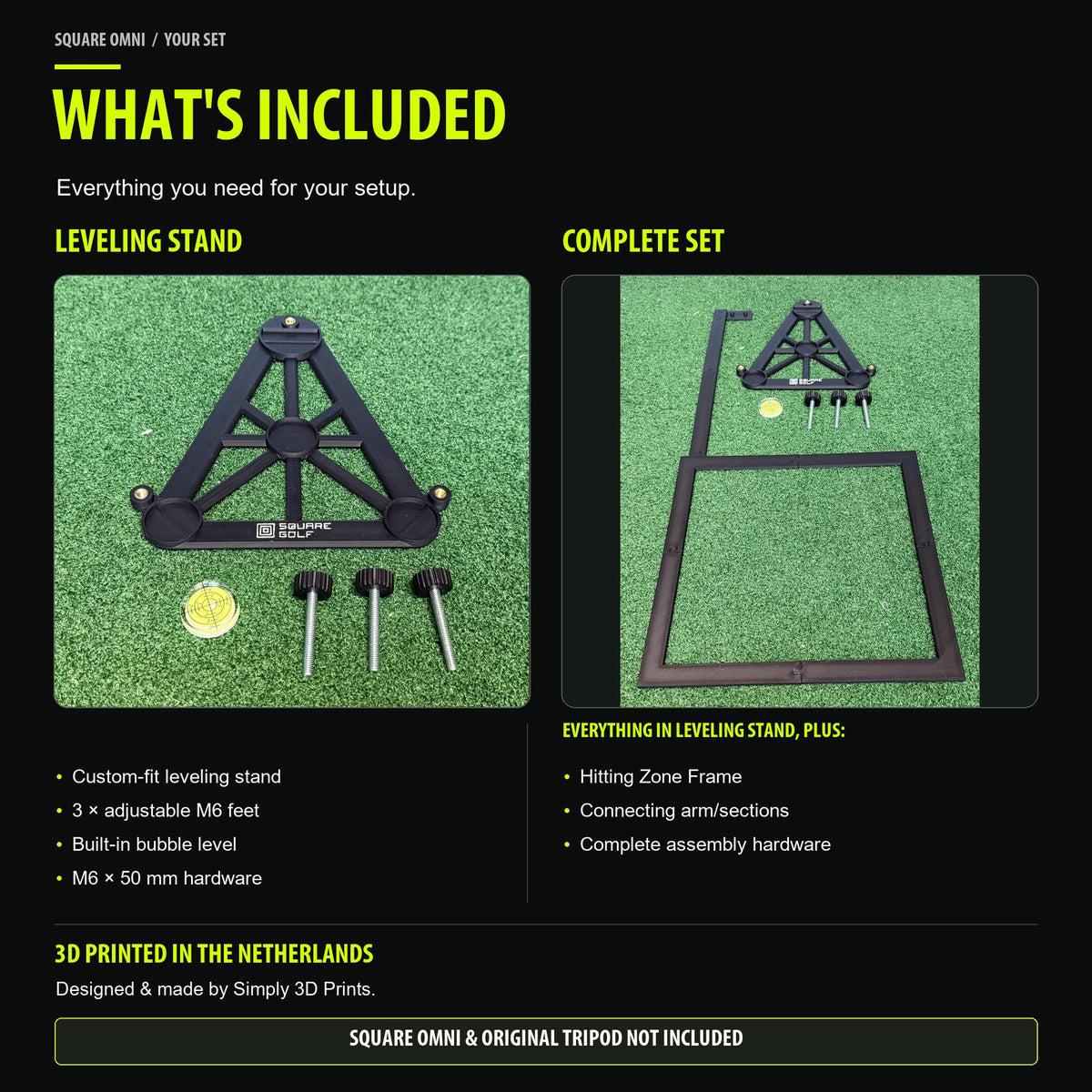
What's Included
Leveling Stand
- 1× Custom-fit Square Golf Omni leveling stand
- 3× Adjustable leveling feet (M6 × 50 mm)
- 1× Bubble level
Complete Set
Everything included in the Leveling Stand option, plus:
- 1× Hitting Zone Frame
- Connecting arm and frame sections
- Required assembly hardware
Important: The Square Golf Omni launch monitor and its original tripod are not included. The Hitting Zone Frame is only included with the Complete Set.
How to Use
1. Place your Omni
Position your Square Golf Omni, with its original tripod attached, in the custom-fit leveling stand.
2. Adjust the height and level
Turn the three adjustable feet individually to raise the Omni and match the height of your hitting mat. Use the built-in bubble level to check your setup.
3. Position the Hitting Zone Frame (Complete Set)
Connect the positioning arm and Hitting Zone Frame to the stand. The frame visually marks the recommended hitting area for your Square Golf Omni.
4. Start playing
Once your launch monitor is correctly positioned and leveled, your setup is ready for use.
Always follow the Square Golf Omni manufacturer's instructions for positioning and operation.
Materials & Production
Designed and 3D printed in the Netherlands by Simply 3D Prints.
- Main material: PLA-based 3D printing filament
- Color: Black
- Three adjustable M6 × 50 mm metal leveling feet
- Integrated bubble level
- Custom-designed for the Square Golf Omni's original tripod
Each product is manufactured using 3D printing technology. Minor layer lines and surface variations are normal characteristics of this production method.
Care instructions
- Intended for indoor golf simulator use.
- Avoid prolonged exposure to direct sunlight or excessive heat.
- Clean with a soft, damp cloth.
- Do not expose the printed components to excessive force or impact.
- Check that all components are securely positioned before use.
This is an independently designed accessory by Simply 3D Prints and is not an official Square Golf product.
Shipping & Tracking
Worldwide shipping from the Netherlands
Your order is carefully prepared and shipped from the Netherlands by Simply 3D Prints.
- Tracking information is provided when your order ships.
- Processing and estimated delivery times are displayed at checkout.
- Shipping costs are calculated based on your delivery destination.
- International orders may be subject to import duties, taxes or customs fees, depending on the destination and applicable shipping arrangements.
Please verify your shipping address before placing your order.
For additional information, see our Shipping & Delivery Policy.
Deel